Monday, April 15, 2024

Configurable Business Documents in Dynamics 365 Finance and Operations - PART 1 - Solution components


CONFIGURABLE BUSINESS DOCUMENTS IN DYNAMICS 365 FINANCE AND OPERATIONS - PART 1 - SOLUTION COMPONENTS

This article series explains and demonstrates configurable business document use in real life scenarios. The purpose is to provide a unique implementation resource. Whole series will be in 5 parts as follows:

PART 1: Solution components

Let's get started with PART 1.

Introduction

Configurable business documents allow you to generate or modify reports/business documents without any development work. Using Microsoft Office-based templates, Microsoft offers predefined documents—familiar tools for customizing business documents to your company's specific needs. This approach not only facilitates customization but also paves the way for creating a marketplace. This marketplace features standard and regulatory business documents tailored for specific industries or regions not covered by Finance and Operations apps. Microsoft's ER template library includes about 5,000 templates. Some are available in either Word or Excel formats, or both. Not all templates in the library are for the business documents solution; however, the entire business documents solution relies on the electronic reporting functionality.


Configurable Business Document Components

Documents are generated via 4 layers: Source, data model, model mapping, and format.

Source: D365 Finance and Operations or Dataverse.

Data Model: A data model is a set of business entities and a hierarchically structured definition of relations between those entities. A single data model component can contain several hierarchies of domain-specific business entities. It can also contain model mappings that support a report-specific data flow at runtime.

The hierarchies are differentiated by a single record that is selected as a root for model mapping. For example, the data model of the payment domain area might support the following mappings:

  • Company > Vendor > Payment transactions of the AP domain
  • Company > Customer > Payment transactions of the AR domain

Model Mapping: Model mapping links application data sources to individual elements of a data model that specify, at runtime, the data flow and rules for entering business data in a data model component.

Format: The document itself. A format component is the scheme of the reporting output that is generated at runtime.

Component versions: The version that was originally created is marked as a Draft version. This version can be edited and is available for test runs. The Draft version can be converted to a Completed version. This version can be used in local reporting processes. The Completed version can be converted to a Shared version. This version is published in Microsoft Dynamics Lifecycle Services (LCS) and can be used in global reporting processes. The Shared version can be converted to a Discontinued version. This version can be deleted.

Illustration of the electronic report layers is as below:


Below image shows ER (Electronic Reporting) layers of Invoice Model in D365 FO.

Electronic reporting workspace >> Reporting configurations


When the provider is Microsoft, you CANNOT make any changes, but you can derive another document to work on.  In order to derive (generate) a document, you MUST create a custom configuration provider in Electronic Reporting workspace and activate it.
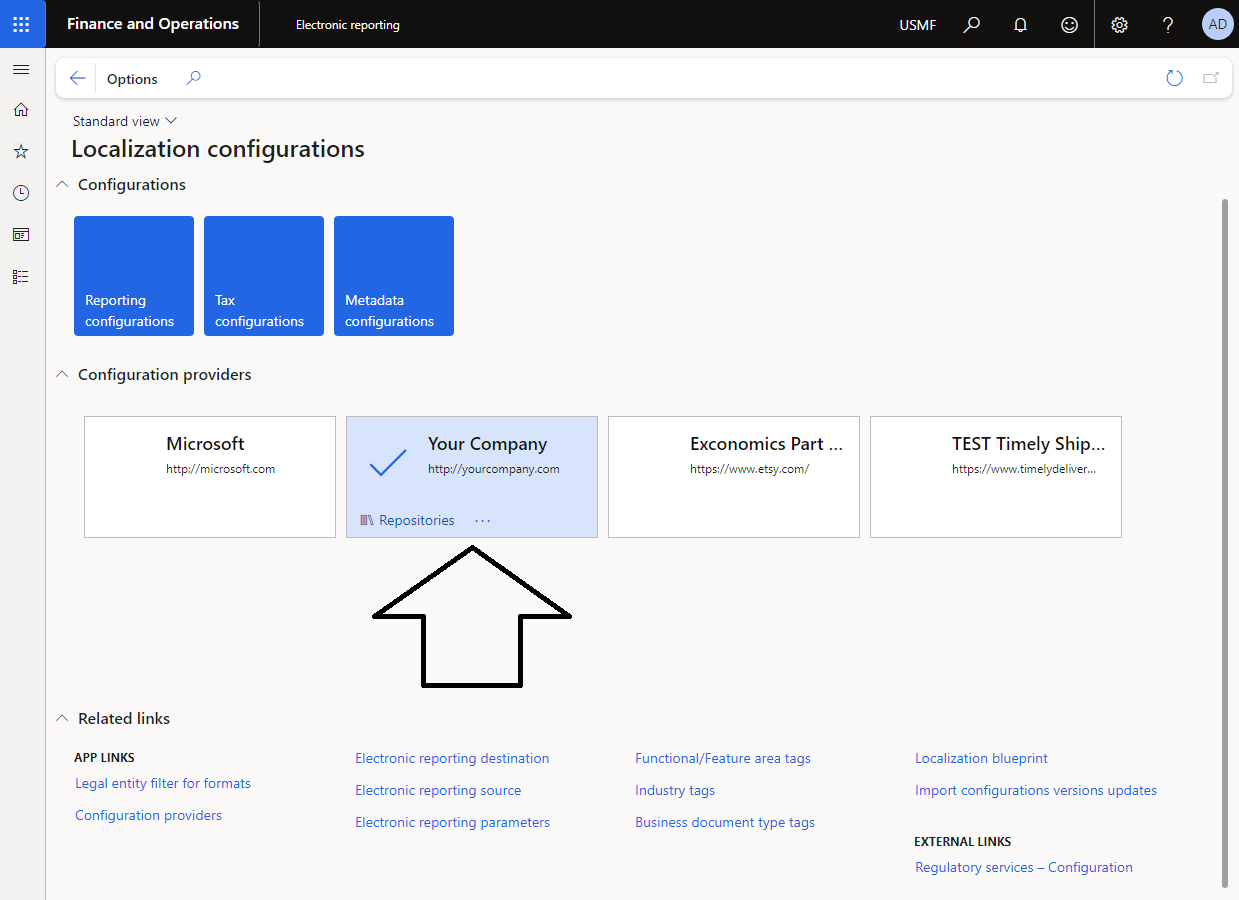


We will get into the details of that in PART 3 of this article series.

List of Business Documents

Configurable business documents are built on top of the ER framework and enable business users to edit business document templates by using a Dynamics 365 service or appropriate Office desktop application.

Configurable business documents is an important part of Microsoft's Globalization Studio.

Available configurable business document list is as below:


How to Download and Import Configurations

Go to https://lcs.dynamics.com/V2/SharedAssetLibrary 

Click on an individual report to download it. You can alternatively click on DOWNLOAD ALL to download the entire library that has 5K reports.


Downloaded schemas will be uploaded to the Reporting configurations in Dynamics 365 Finance. This will be covered in detail in Part 2 of this article series.

How to Tell System to Use Configurable Business Document instead of SSRS

You should assign an ER destination in the module's print management parameters. For example, we want the customer's payment advice to utilize the new Business Document design via print management.  

Go to the print management screen of the module.


Change original document design from SSRS to new configurable business document.


Save and close the page.

The next step is to test the configuration.

Go to a customer payment journal and print a payment advice. Don't forget to use print management.


.


The configurable business document template is automatically generated by the system.
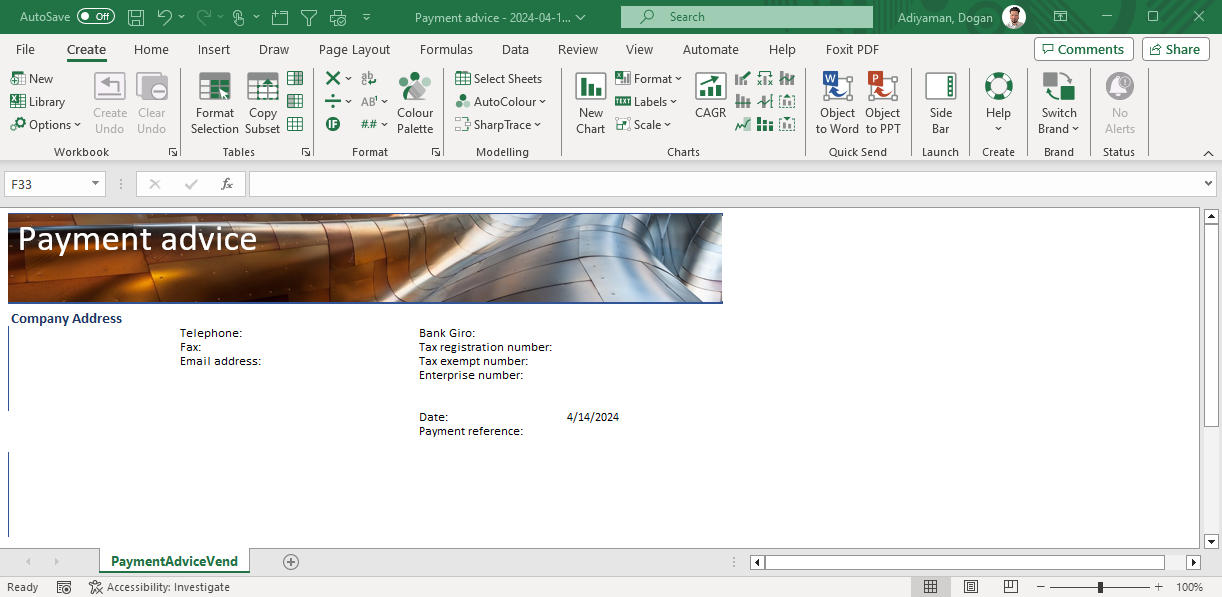


This wraps up the first installment of our five-part series on Configurable Business Documents in Dynamics 365 Finance and Operations, where we've delved into the essential solution components. 

Microsoft's Office-based templates make it straightforward to customize business documents to fit your company's unique needs. These templates are built on Dynamics 365's electronic reporting framework. 

Stay tuned for more insights in the upcoming parts of the series.

Monday, April 8, 2024

Enhancing Dynamics 365 Finance and Operations with Copilot - PART 3 - Copilot applications in Dynamics 365 ERP


DYNAMICS 365 FINANCE AND OPERATIONS & MICROSOFT'S AI COPILOT

This article series provides an overview of Copilot usage in Dynamics 365 Finance and Operations apps.

Copilot will be explained in 3 posts:

PART 3: Copilot applications in Dynamics 365 ERP

This is the last part of the series. Let's get started.

CONTENT

Introduction
Copilot applications
Summary

COPILOT APPLICATIONS IN DYNAMICS 365 ERP

Introduction

When Microsoft's first copilot release was done, the announcement had covered both CRM and ERP which today included below Dynamics applications.

  • Copilot in Dynamics 365 Business Central
  • Copilot in Dynamics 365 Customer Service & Microsoft Copilot for Service
  • Copilot in Dynamics 365 Customer Insights
  • Copilot in Dynamics 365 Customer Insights - Journeys
  • Copilot in Dynamics 365 Field Service
  • Copilot in Dynamics 365 Project Operations
  • Copilot in Dynamics 365 Sales & Microsoft Sales Copilot
  • Copilot in Dynamics 365 F&O Help & Guidance
  • Copilot in Dynamics 365 Commerce
  • Copilot in Dynamics 365 Finance
  • Copilot in Dynamics 365 Supply Chain Management

Our focus will be Dynamics 365 Finance and Dynamics 365 Supply Chain Management.

Copilot Applications

Generative help and guidance with copilot: AI-Generated Help and Guidance with Copilot in Version 10.0.38 provides users with immediate contextual assistance directly within the application. Users can interact with Copilot by typing prompts in natural language. AI-Powered Conversational Support features an intuitive interface where Copilot offers natural language interactions, helping users navigate and perform tasks within finance and operations applications and thereby simplifying complex processes.


Inventory visibility and copilot: Inventory visibility and Copilot integration in Version 10.0.38 now allows users to interact with Copilot for inventory information. For instance, users can type requests like 'Show me all 14-inch laptops in the Chicago warehouse' without needing to remember exact specifications. The Inventory Visibility service works alongside Copilot in Dynamics 365 Supply Chain Management to offer a natural-language inventory search feature. To start using this feature, you will need to:

  • Install the Inventory Visibility Add-in
  • Set up Inventory Visibility integration in Supply Chain Management
  • Update the Inventory Visibility Add-in.

Demand Forecasting and Copilot: Dynamics 365 Supply Chain Management utilizes AI-powered demand forecasting algorithms to generate more accurate forecasts. Leveraging the advancements in generative AI capabilities, Microsoft has enhanced these forecasts with the introduction of Copilot features. In version 10.0.39, Copilot will significantly improve demand planning capabilities by explaining how forecasts are created, aiding planners in detecting patterns and anomalies. Additionally, it will enable planners to understand complex correlations across datasets through natural language interactions.

Purchase Order Changes and Copilot: This feature is designed to enhance procurement decision-making by efficiently managing changes to purchase orders. Within the 'Procurement and Sourcing' module, the 'Confirmed Purchase Orders with Changes' workspace provides a comprehensive list of all confirmed purchase orders that have undergone changes since their confirmation. These changes are categorized into three risk levels to help users quickly assess and address potential impacts. This structured approach ensures procurement decisions are informed by the latest order information and risk assessments.


Low risks: This tile shows changes to purchase orders that have no known impact on downstream demand since these purchase orders don't have direct connection with any production orders or any sales orders. (In other saying, no impact on the rest of the supply chain). The tile at the top provides and AI-generated, natural-language summary of the changes. The Show link shows corresponding filtered view at the bottom of the screen. Buyer reviews the changes and can then accept them. The procedure for confirming the changes is the same as the procedure for confirming a purchase order for the first time. After the selected purchase orders are reconfirmed, they're moved back to the Confirmed state.

High risks: This tile shows purchase orders that have known downstream impacts on demand like safety stock, production order or sales order deadlines. "High impact changes" is about identifying and prioritizing the most critical changes to demand resulting from changes in purchase orders, focusing on those with the highest impact.

Impacted downstream orders: This tile shows downstream orders that are affected from the purchase order changes. "Impacted downstream orders" provides a broader, more detailed breakdown of impacts by type of demand order like safety stock, production order or sales order.

Finance and Copilot: The focus is to help finance department to save time and stay on top of the critical decisions by providing guided actions, and recommendations.

User can prompt Copilot to “help me understand forecast to actuals variance data.” Immediately, Copilot for Finance will generate insights and pull data directly from ERP, suggesting actions, and generating contextualized text. Users can easily check source data to ensure transparency before using Copilot to take any actions. Another example is Collections coordinator workspace. Copilot in Dynamics 365 Finance displays AI-generated summary on the new Collections coordinator workspace. With this, collection coordinators can increase more timely payments.


Summary

This article concludes a series on utilizing Copilot in Dynamics 365 Finance and Operations apps, focusing on Dynamics 365 Finance and Dynamics 365 Supply Chain Management. It highlights the significant benefits of Copilot's AI-driven features, such as AI-generated help and guidance, conversational support for navigating finance and operations applications, inventory visibility, demand forecasting, and enhanced purchase order management. These features not only offer real-time, contextual assistance to users but also simplify complex processes, improve demand planning capabilities, and support more informed procurement decisions. By integrating Copilot, Dynamics 365 apps leverage AI to enhance inventory searches, forecast accuracy, and provide actionable insights for the finance department, all through natural language interactions.

Sunday, March 31, 2024

Enhancing Dynamics 365 Finance and Operations with Copilot - PART 2 - Install Copilot and connect to an Dynamics 365 ERP

DYNAMICS 365 FINANCE AND OPERATIONS & MICROSOFT'S AI COPILOT

This article series provides an overview of Copilot usage in Dynamics 365 Finance and Operations apps.

Copilot will be explained in 3 posts:

PART 2: Install Copilot and connect to an Dynamics 365 ERP

Let's get started with PART 2

CONTENTS

Introduction
Finance and operations apps and Dataverse connection
Copilot installation and deployment in Power Platform (Dataverse)
AI security role assignment
Summary

INSTALL COPILOT AND CONNECT TO AN DYNAMICS 365 ERP

Introduction

Copilot is powered by the Azure OpenAI Service, which combines the capabilities of large language models (LLMs) with the business data residing in Dynamics 365 ERP. Copilot leverages the data in your Power Platform environment, as well as the data in Dynamics 365, Microsoft 365, and other sources, to provide relevant and accurate suggestions.

Finance and operations apps and Dataverse connection

In the fast-paced world of ERP, the integration of artificial intelligence through Copilot is not just an innovation, it's a game changer. Dynamics 365 ERP stands at the heart of business operations, managing everything from supply chain logistics to financial transactions. This guide provides an overview to implementing Copilot within your Dynamics 365 environment, empowering your business with AI capabilities.

As a prerequisite, your environment must be a cloud-deployed environment.

Second prerequisite, you must have enabled the Power Platform integration in Microsoft Dynamics Lifecycle Services. If you have any power apps in your system then this integration would be already in place.

Copilot installation and deployment in Power Platform (Dataverse)

Step 1: Enable the SQL row version change tracking license key

  • Put the environment on Maintenance mode on LCS
  • Navigate to the License Configuration form to activate Sql row version change tracking: System administration >> Setup >> License configuration


Activating the "SQL row version change tracking" license key in Dynamics 365 before setting up Co-pilot is needed because it helps keep track of every little change in your data. Think of it like setting up a system that notes down every edit, addition, or deletion in your information files. Co-pilot uses this info to work correctly, ensuring it always has the latest updates to help you better. Without this setup, Co-pilot will miss out on recent changes, making it not possible in assisting you.

STEP 2: Enable Power Platform to publish bots with AI features

Note: The copilot for app users in model-driven apps feature isn't enabled by default. Administrators must manually enable this feature for their environments in Power Platform admin center. 

The next step is to enable our power platform environment to publish bots with AI Features:

  • Access Power Platform Admin Center https://admin.powerplatform.microsoft.com/
  • Click on Environment on the navigation pane
  • Select your environment and click on Settings at the top
  • Select the Product, then Features
  • In Features section, activate the set the value for Allow users to analyze data using an AI-powered chat experience in canvas and model-driven apps to On in the dropdown control and Save your changes


STEP 3: Install the Copilot application in finance and operations apps environment

The last part is the actual copilot installation in the environment.


  • Select Get it now
  • System automatically opens Power platform admin center
  • Select your environment, agree to all of terms and conditions, click on Install


AI security role assignment

The next step is to assign security roles that are one of the copilot installation components.

Users who should have access to the functionality must be assigned the AIB Roles and Finance and Operations AI security roles in Dataverse.

  • Select the users or teams that should have access, and assign the AIB Roles and Finance and Operations AI security roles to them

Summary

Integrating Copilot into Dynamics 365 ERP through the outlined steps equips your business with AI-driven insights and efficiencies. By enabling SQL tracking, activating AI features in Power Platform, and installing Copilot followed by security role assignments, your organization can leverage artificial intelligence to optimize operations, decision-making, and customer engagement.

In Part 3, we’ll dive into how Copilot really works in the day-to-day of Dynamics 365 ERP. You'll see real examples of how this tool changes the game, making tasks easier and insights sharper. It’s about seeing the real impact of AI in action, from streamlining operations to sparking new ideas. Get ready to explore a world where technology and practicality meet to make your work smarter.

Saturday, March 23, 2024

Enhancing Dynamics 365 Finance and Operations with Copilot - PART 1 - Introduction

DYNAMICS 365 FINANCE AND OPERATIONS & MICROSOFT'S AI COPILOT


This article series provides an overview of Copilot usage in Dynamics 365 Finance and Operations apps.

Copilot will be explained in 3 posts:

PART 1: Introduction to Copilot

Let's get started with PART 1

INTRODUCTION TO COPILOT

Microsoft Copilot in Dynamics 365 Finance and Operations uses AI to enhance ERP functionality, providing a blend of conversational AI, embedded insights, and integration across applications. This innovative approach aims to streamline operations, boost productivity, and facilitate smarter decision-making. 

Before going further, let's talk about the some of new terminologies:

  • Sidecar – Copilot sits alongside the application as a sidecar and provides conversational support to the user. The sidecar is the primary Copilot interface in finance and operations apps. It provides a natural language chat experience that helps users work with application functionality and data.
  • Embedded – These Copilot features add intelligent capabilities to the application itself. In this way, they bring AI to the center of the application experience. For example, in the Confirmed purchase orders with changes workspace, AI capabilities that are built into the page help users understand and react to changes in confirmed purchase orders.
  • Outside – External agents help orchestrate across different apps and tasks. For example, users can use Copilot to ask questions about finance and operations data.
  • Responsible AI  An AI system includes not only the technology but also the people who use it, the people who are affected by it, and the environment where it's deployed. Microsoft's Responsible AI FAQs are intended to help you understand how AI technology works, the choices that system owners and users can make that influence system performance and behavior, and the importance of thinking about the whole system, including the technology, the people, and the environment. You can use Responsible AI FAQs to better understand specific AI systems and features that Microsoft develops. Responsible AI FAQs are part of a broader effort to put Microsoft's AI principles into practice. To learn more, see Microsoft AI principles.
Next is the application areas. Copilot features include:

  • Conversational AI Support: A sidecar where Copilot provides natural language interactions to help users navigate and perform tasks within the finance and operations applications, simplifying complex processes.
  • Embedded Intelligence: AI can be directly integrated into Dynamics 365 business processes. Application example: Copilot helps users manage changes in confirmed purchase orders and other critical financial operations, embedding insights where they're most needed​​. More to come in the near future.
  • Cross-Application Orchestration: Copilot extends beyond Dynamics 365, leveraging AI to interact with data across Microsoft's ecosystem, enhancing efficiency and providing seamless access to information​​. Application example: Microsoft Dynamics 365 Supply Chain Center is an enterprise-grade solution that integrates data from ERPs and supply chain systems into Microsoft Dataverse to enhance supply chain resiliency. It provides actionable insights, end-to-end visibility, and potential disruption prediction.

Bringing Microsoft Copilot into the Dynamics 365 Finance and Operations mix is pretty much a game changer for how businesses manage their financial and operational processes. It’s like having a super smart assistant that not only talks back but also gets what you’re trying to do, making your life a lot easier. The integration of conversational AI, embedded intelligence, and cross-application orchestration within Dynamics 365 offers a comprehensive, user-friendly solution that enhances efficiency, productivity, and decision-making capabilities.

The introduction of terminologies such as Sidecar, Embedded, Outside, and Responsible AI highlights Microsoft's commitment to developing AI technologies that are accessible, intuitive, and ethically responsible. These features not only streamline user interactions but also ensure that AI implementations are transparent, understandable, and considerate of their impact on individuals and the environment.

As Microsoft continues to expand the capabilities of Copilot, users can anticipate further innovations that integrate AI more deeply into finance and operations workflows. These advancements are likely to open up new possibilities for automating complex processes, predicting market trends, and providing actionable insights that drive strategic decision-making.

To sum it up, Microsoft Copilot is shaking up the traditional ERP scene in a big way. It’s about making technology not just work harder, but smarter and in a way that’s way more user-friendly. With its focus on making things easier for us humans, predicting our needs, and keeping the ethical side of tech in check, Copilot is paving the way for a new chapter in how businesses operate. As we all start getting on board with this tech, we’re in for a smoother, smarter, and more efficient ride. Pretty exciting times ahead!

The next article (PART 2) will address the initial steps necessary for integrating Copilot into Dynamics 365 ERP systems. It will detail the prerequisites required for installation and the activation of Copilot capabilities within finance and operations applications. This guide is intended as an overview resource for professionals looking for leveraging AI capabilities to enhance their ERP systems.

Understanding Telemetry Pricing for Dynamics 365 Finance & Operations (D365FO)

UNDERSTANDING TELEMETRY PRICING FOR DYNAMICS 365 FINANCE AND OPERATIONS (D365FO) CONTENT Introduction D365FO Telemetry Capabilities Key Pric...