Monday, December 9, 2024

Performing Segregation of Duties (SOD) Risk Analysis in Dynamics 365 Finance and Operations (D365FO) - PART 2: Using RSM's Power App (GRC Guardian)


PERFORMING SEGREGATION OF DUTIES (SOD) RISK ANALYSIS IN DYNAMICS 365 FINANCE AND OPERATIONS (D365FO)

CONTENT

Introduction
Solution Components of GRC Guardian for SOD Risk Analysis
Configuring GRC Guardian for SOD Risk Analysis
Detecting and Analyzing SOD Violations with GRC Guardian
Summary and Insights

This article series explains how to perform a Segregation of Duties (SOD) analysis using 3 different tools for Dynamics 365 Finance and Operations. The purpose is to provide various options. The entire series will consist of 3 parts, as follows:

Performing Segregation of Duties (SOD) Risk Analysis in Dynamics 365 Finance and Operations (D365FO)

PART 2: Using RSM's Power App (GRC Guardian)
PART 3: Using Fastpath

Let's get started with PART 2.

Introduction

In PART 1 of this series, we introduced the concepts of segregation of duties (SOD) risk analysis and demonstrated how to perform it using Dynamics 365 Finance and Operations (D365FO) out-of-box features. In this article, we shift our focus to RSM’s proprietary Power App, GRC Guardian, a managed service that simplifies SOD risk analysis. As part of RSM’s intellectual property, GRC Guardian enables organizations to efficiently assess and address SOD risks after a brief analysis session to identify applicable rules. My role as a consultant on Dynamics 365 Finance and Operations implementations has provided valuable insights into utilizing this innovative tool for effective risk management.

RSM's GRC Guardian is a custom application designed to assess and evaluate security risks across platforms such as Dynamics 365, SAP, Oracle, and NetSuite. It provides actionable insights to identify potential vulnerabilities in application security roles and user access efficiently.

The Power App is built with a persona-based architecture to restrict access at the ERP client and project levels. Leveraging Microsoft Azure Active Directory for authentication and access control, the application ensures robust data privacy and protection, allowing only authorized RSM employees to access specific modules.

Solution Components of GRC Guardian for SOD risk analysis

In RSM's Power App, GRC Guardian, Segregation of Duties (SOD) revolves around security extraction (objects, privileges, duties, and roles), RSM's industry best-practice SOD ruleset, and technical mapping that links security objects to business activities—a fundamental concept within the app's framework. The SOD ruleset and technical mapping are customizable, with the results seamlessly integrated into GRC Guardian. Below are the key solution components of RSM's GRC Guardian tool:

Security Roles, duties, and privileges

Security roles are the top-level entities in D365FO's security model, grouping duties and privileges necessary for specific business tasks. Roles like "Accounts Payable Manager" or "Inventory Clerk" ensure users have access only to features relevant to their job functions.

Duties represent collections of related privileges tied to specific responsibilities, such as approving invoices, processing payments, or creating purchase orders.

Privileges, the most granular access definitions in the security hierarchy, control access to individual forms, menu items, or actions within the application. By combining privileges into duties, D365FO implements a layered approach to access control. This structure is critical for managing SOD conflicts, as risks often arise when users are assigned conflicting privileges.


Segregation of Duty Rules

SOD rules specify which combinations of business activities are considered incompatible and must not be assigned to the same user. For example:

Conflict Example: If a user is assigned both "Create or change vendor master records" and "Vendor invoice entry/registration" business activities, they could create fictitious vendors, alter vendor details (e.g., name or address), and initiate unauthorized payments to those vendors.

The list of these conflicts forms the Segregation of Duties (SOD) Framework, also known as the SOD ruleset.

Technical Mapping

Technical mapping is the process of teaching the Power App what "Create or change vendor master records" and "Vendor invoice entry/registration" are. This process, also known as Technical Security Modeling, is entirely customized and based on insights gathered during a brief interview.

Technical mapping encompasses forms, buttons, tables, and reports. It also incorporates components from the sensitive access framework, which will be discussed in another article. For example, the technical mapping of a form includes its display menu item, other menu items granting access to the same form, and critical buttons within the form.

This mapping must be completed for all business activities.

SOD Violations Detection and Analysis

The Power App includes an algorithm to detect SOD conflicts, helping administrators identify violations and ensure compliance with regulatory standards like SOX.

Conflict Resolution: D365FO provides workflows and configuration options to address conflicts, such as modifying security roles or distributing responsibilities among multiple users.

Mitigation / Remediation Tools: Workflows and ITACs

SOD enforcement in D365FO relies on workflows and additional parameters such as 3-way matching and posting profiles. These tools help organizations establish a secure environment that supports operational efficiency while ensuring compliance with internal and external regulations.

ITACs complement SOD enforcement by reinforcing security principles in Dynamics 365 Finance and Operations (D365FO). The risk analysis generated by GRC Guardian is reviewed, and mitigating or remediating ITACs are implemented to address identified risks.

Configuring GRC Guardian for SOD risk analysis

Security Role Access Extractions

GRC Guardian needs D365FO security roles to be extracted properly as illustrated below:

Go to System administrator >> Security >> Security configuration
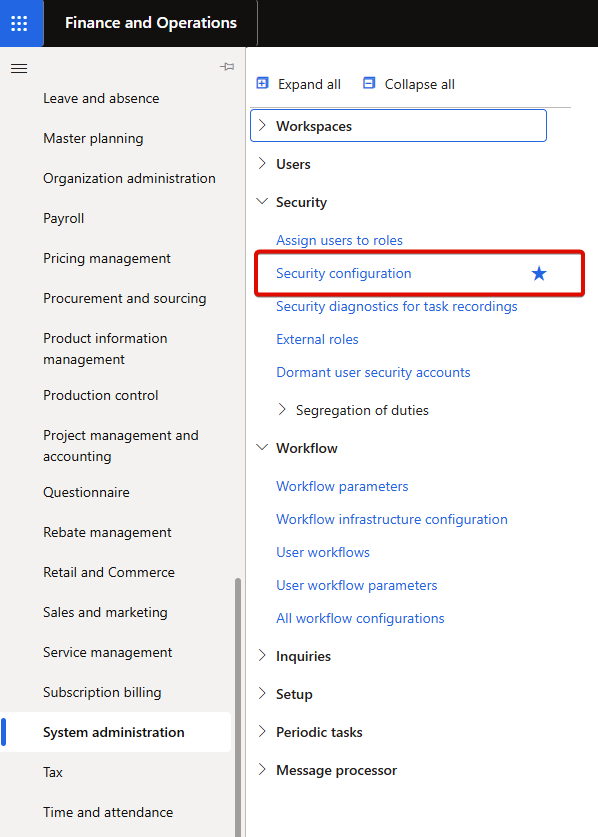
Select the desired role and click Permissions.


All role permissions are listed.


Proceed with the security extraction by right-clicking any column header and selecting Export all rows.

The extracted user access data will appear as shown below.

This process must be repeated for all roles, and the resulting files should be consolidated. Once completed, all user access information will be available.

Security User Role Assignment Extractions

Next extraction is "user & security role assignments". Go to Data management workspace and create an export project that has Security user role association entity.

Run the project and extract the data.


Extracted document looks like as below:

As a result, all security role permissions, along with user and role assignments, are now prepared and available.

Segregation of Duties Framework

GRC Guardian enables the creation of a custom Segregation of Duties (SOD) framework, designed efficiently during a brief meeting. These rules define which combinations of business activities are incompatible and should not be assigned to the same user.

The identified conflicts collectively form the Segregation of Duties (SOD) framework, also referred to as the SOD ruleset.

Navigate to RSM GRC Guardian that is part of RSM’s extensive portfolio of digital solutions in RSM's Automation on Demand platform.


Select the relevant business processes (e.g., Purchase to Pay, Record to Report, Order to Cash) for SOD risk analysis.

Choose the RSM industry best-practice risk levels that will be subject to risk analysis.

Generate a working file by clicking Export to excel.


Once exported, the Excel file can be customized further by adding new rules, modifying rule definitions, or adjusting risk ratings. The goal is to create a fully tailored SOD rule list.

Technical Mapping

Once the custom SOD rule list is finalized, the next step is to educate GRC Guardian. This involves what "Create or change vendor master records" and "Vendor invoice entry/Registration" are. This is called Technical Security Modeling. This process, known as Technical Security Modeling, is entirely customized and typically based on insights gathered during a brief interview.

GRC Guardian automatically generates a technical mapping based on selected business processes. The content of technical mapping is independent of the risk ratings.

The generated technical mapping can be modified and re-imported into GRC Guardian to include customized security objects, ensuring the mapping aligns with specific business requirements.

Detecting and Analyzing SOD Violations with GRC Guardian

GRC Guardian includes an algorithm for detecting SOD conflicts. Administrators can utilize this feature to identify violations and support compliance with regulatory standards such as SOX.

Conflict Resolution: D365FO provides workflows and configuration options to address identified conflicts, including modifying security roles and distributing responsibilities across multiple users.

GRC Guardian offers two types of analysis: SOD risk analysis and Sensitive Access (SA) analysis.

When the risk analysis is run, three types of documents are generated:

▶️ Raw risk analysis data in excel format


▶️ A summary that can be modified in power point format

▶️ A dashboard in POWER BI format


Each document gives insights about

  • Overall Executive Summary: This section provides a high-level overview of the SOD and SA analysis performed. It includes the total number of roles, total number of users, and total number of SOD rules used in the analysis. The remainder of the page highlights the findings, such as roles and users with violations.
  • Internal role SOD risks: This page provides an overview of SOD analysis within roles. In other words, inherited role violations are displayed here. 
  • User SOD Risks: This page provides an overview of SOD analysis from the user perspective. It includes the number of users with SOD violations, details of violated SOD rules, impacted business processes, the number of SOD violations per user, and the distribution of users by role.
  • Role & User SA Analysis Overview: This page provides an overview of SA analysis, including SA conflicts. Additionally, it details violations by business processes, risk rankings, the number of roles with SA violations, the number of SA violations by role, the number of users with SA violations, the number of SA violations by user, the number of roles by user, and the number of users by role.

Summary and insights

RSM’s GRC Guardian Power App simplifies Segregation of Duties (SOD) risk analysis in Dynamics 365 Finance and Operations (D365FO). As a managed service, it is highly affordable, eliminating the need for additional licensing. Its customizable SOD frameworks, advanced technical mapping, and automated risk detection ensure compliance with standards like SOX. The tool can be configured efficiently after just a few short meetings—one to define SOD rules and another to validate the technical mapping. With actionable insights and streamlined implementation, GRC Guardian is a valuable solution for managing application security and mitigating risks. Stay tuned for the next article, where we explore SOD risk analysis using Fastpath.

Wednesday, December 4, 2024

AI Summary in Dynamics 365 Finance and Operations (Copilot - D365FO)


AI SUMMARY IN DYNAMICS 365 FINANCE AND OPERATIONS (COPILOT - D365FO)

CONTENT

Introduction
Upcoming D365FO copilot features
AI summary (Context-Aware summarization)
Conclusion

Microsoft continues to innovate, expanding Copilot's feature set to simplify complex processes, improve decision-making, and boost operational efficiency. In my previous article series on Microsoft Copilot, I provided an overview of its fundamental capabilities and how it integrates with Dynamics 365 Finance and Operations apps. From introducing core concepts like conversational AI and embedded intelligence to exploring installation processes and practical applications, the series highlighted how Copilot revolutionizes ERP functionality. 

After building that foundation, this article dives deeper into some of the additional and upcoming Copilot capabilities that further enhance the Dynamics 365 Finance and Operations experience. We’ll explore contextual summaries that provide actionable insights across key areas such as products, vendors, purchase orders, customers, sales orders, workflow history, and collections.

Let’s dive into the details.

UPCOMING D365FO COPILOT FEATURES

Microsoft is adding new features to Copilot in Dynamics 365 Finance and Operations to make tasks easier and more efficient. These updates will help automate work in areas like procurement and finance, saving time and improving productivity. Some important upcoming features are as follows:

Automate procure-to-pay tasks with the supplier communications agent (SCM): Purchasers spend significant manual effort checking incoming emails, assessing the status of each purchase order, replying to and following up with suppliers, and updating systems. The supplier communications agent can help purchasers by identifying and understanding email correspondences related to purchase orders, analyzing them together with organizational data, identifying both purchase order confirmations and change requests, and carrying out automated tasks based on user-defined rules. For example, the agent can automatically send reminders to suppliers that haven’t yet responded to a purchase inquiry. It brings incoming change requests to the attention of purchasers when a vendor can't deliver on time or in full and offers the option to update a purchase order according to a change request. (Public review February 2025 - subject to change).

Reconcile with subledger to general ledger reconciliation agent (FINANCE): Reconciliation of data is a time-consuming process, often deferred until the end of a period. This can add time and headaches to the completion of the period end tasks. The subledger to general ledger reconciliation feature will change this process to be proactive, rather than reactive, when a difference is identified. Copilot will be used to notify the user of a difference between the subledger and the general ledger, provide options for how to resolve the issue, and eventually resolve the issue on behalf of the user. Reconciliation should no longer be a bottleneck, but instead, is always in a continuous state of readiness. (Public review March 2025 - subject to change).

AI SUMMARY (CONTEXT-AWARE SUMMARIZATION)

AI Summary aka Context-aware summarization brings tailored insights directly to users, streamlining data interpretation and decision-making across various areas in Dynamics 365 Finance and Operations.

PRODUCTS

The Released product details page contains a Summary by Copilot FastTab, providing a tailored product overview that adapts to the user's frequently accessed pages and current context.

Go to Product information management >> Products >> Released products to open released products list page. Select an item and go to item details.


This form provides a detailed summary of the released product, including general inventory data as well as procurement and sales information.

Additionally, when you hover over an item number in any form, the system displays a summary of the product based on the most used forms and the relevant context. The content displayed is tailored to your security role, ensuring access to appropriate information.

Go to Sales and marketing >> Sales orders >> All sales orders to open sales orders list page. Select an order and go to order details.

Hover over the item number.


When you hover over an item number in any form, the system displays a summary of the product based on the most used forms and the relevant context. The content displayed is tailored to your security role, ensuring access to appropriate information.

VENDORS

Go to Procurement and sourcing >> Vendors >> All vendors to open vendors list page. Select a vendor and go to vendor details.


Vendor summary provides a comprehensive overview of key vendor details, including on-hold status, rebates, and open purchase orders. It consists of two fields:

Status: This field summarizes essential vendor information, including order, invoice, and payment statuses.

Insights: This field highlights notable outlier events, such as risks associated with overdue purchase lines, delivery trends, vendor history, and potential foreign exchange losses from outstanding invoices.

PURCHASE ORDERS

Go to Procurement and sourcing >> Purchase orders >> All purchase orders to open purchase orders list page. Select an order and go to order details.


Each purchase order summary shows an overview of a selected purchase order's status.

The purchase summary provides a comprehensive overview of key order details, including on-hold status, rebates, and open purchase order lines. It consists of two fields:

Status: This field includes generic summary of the order, including total number of lines, received lines and invoiced lines.

Insights: This field highlights notable outlier events, such as backordered lines, lines about to be backordered, lines with missing confirmed receipt dates.

CUSTOMERS

Go to Sales and marketing >> Customers >> All customers to open customers list page. Select a customer and go to customer details.


When a customer is selected, the AI-generated content appears on the Summary FastTab. Azure OpenAI generates the results based on data in Finance and the provided prompts.

It uses the following transaction data as inputs: Customer invoices, Customer payments, Sales orders, Sales agreements, Rebates, Outstanding invoices, Delayed order lines.

Summary FastTab consists of two fields:

Status: This field summarizes essential customer information, including order, invoice, and payment statuses.

Insights: This field highlights notable outlier events, such as risks associated with overdue invoices, highest overdue invoice, overdue order lines, and orders shipped but not invoiced.

SALES ORDERS

Go to Sales and marketing >> Sales orders >> All sales orders to open sales orders list page. Select an order and go to order details.


The Sales order details page includes a Summary by Copilot FastTab that shows an overview of the selected sales order's status.

Summary FastTab consists of two fields:

Status: This field includes generic summary of the order, including total number of lines, shipped lines and invoiced lines.

Insights: This field highlights notable outlier events, such as backordered lines, lines about to be backordered, lines with missing confirmed ship dates and lines to be shipped at the current date so that you are aware of order shipments.

WORKFLOWS

Navigate to Workflow history to review detailed records of workflow submissions. Go to Organization administration >> Workflow >> Workflow history. The page shows the list of all submitted workflows.


Change the ‘Status’ filter if necessary.

Click Instance ID to see the workflow history.


The Summary by Copilot field leverages Azure OpenAI to provide concise, context-driven insights, ensuring a clear and actionable summary of workflow activities.

The Summary by Copilot field appears at the top of any Workflow history page if the workflow was submitted. The first line shows the submitter, submitted date, current status, and comments. The next lines show the most recent workflow actions. Workflow actions include approvals, delegations, rejections, and change requests. The workflow action dates and the user who performed each action are shown together with any comments that were entered.


COLLECTIONS

Go to Credit and collections >> Workspaces >> Collections coordinator to open the Collections coordinator workspace. The page shows an overview of the activities that are assigned to a collections coordinator (collections agent), the customers who have the highest balances, and the customers who have the most overdue amounts.


To get to the Collections coordinator details page, select any customer name. Alternatively, when a Customer account is selected at the top of the page, click View customer detail. The Collections coordinator details page includes the Summary by Copilot field. 


Azure OpenAI is used to generate the results in Balances and payment history, based on data in Finance and the provided prompts. All calculations are done in Finance. The summary is based on the amounts for the selected customer's payment history for the past year, outstanding debt amount, and invoices for the last six months.

To have AI generate a draft email in the form of a reminder letter, select Create reminder email.

CONCLUSION

Microsoft's Copilot is transforming Dynamics 365 Finance and Operations by making daily tasks simpler and more efficient. With features like automated processes, smart notifications, and tailored summaries, Copilot helps users save time and focus on what matters most. Whether it’s managing vendors, reconciling financial data, or handling sales and purchase orders, these tools reduce manual work and make decision-making easier. By using Copilot, businesses can work smarter, improve accuracy, and adapt quickly to changing needs in today's fast-paced world. 

Understanding Telemetry Pricing for Dynamics 365 Finance & Operations (D365FO)

UNDERSTANDING TELEMETRY PRICING FOR DYNAMICS 365 FINANCE AND OPERATIONS (D365FO) CONTENT Introduction D365FO Telemetry Capabilities Key Pric...